

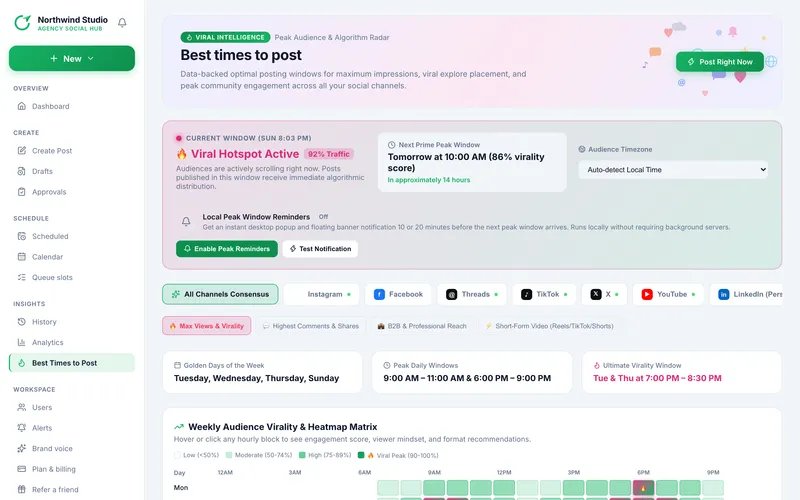
Best Times to Post is built-in guidance about typical audience behaviour on each platform. It is not your account's own results (see Analytics for those).
- Platform tabs: All Channels Consensus or a single platform. A green dot marks platforms you have connected.
- Goal: Max Views & Virality, Highest Comments & Shares, B2B & Professional Reach or Short-Form Video. Each changes which windows are highlighted.
- Time zone: Auto (your own) or a common zone, so you can plan for an audience elsewhere.
- Right-now card: says whether it is a Viral Hotspot, High Traffic or Off-Peak window, and counts down to the next peak.
- Highlights: Golden Days of the Week, Peak Daily Windows and the Ultimate Virality Window.
- 7-day heatmap: every hour of every weekday. Hover or click a block for its score, the viewer mindset and format advice. Colours: Low (under 50%), Moderate (50 to 74%), High (75 to 89%), Viral Peak (90 to 100%).
Post Right Now opens the composer. To schedule at a good hour use the suggestions on the Review step (see Best times in the composer).
Read next
- Peak window reminders Get a browser notification shortly before the next peak window. They run only in your browser.
- Best times to post, in the composer The hour suggestions on the Review step, general advice first and your own results once there is enough data.
- Analytics: the Insights page Date ranges, summary cards, top posts, channel performance and the posts-per-day chart.
More in Analytics and timing
