

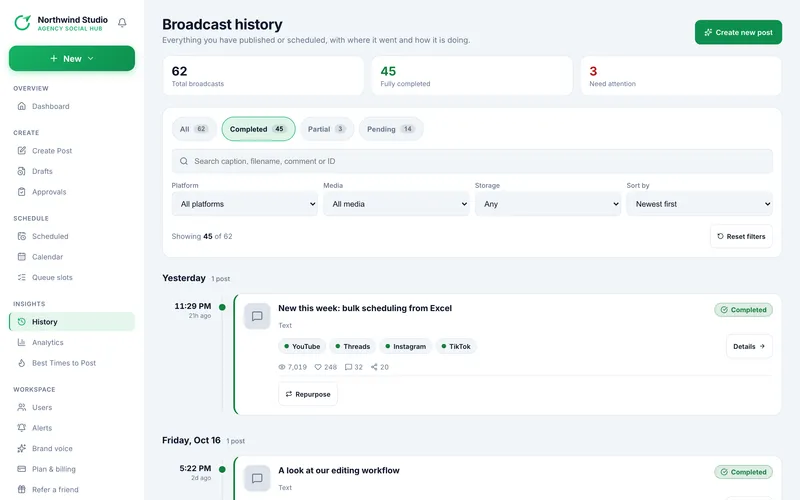
History, titled Broadcast history, lists everything you have published or scheduled, newest first, grouped by day (Today, Yesterday, then the date). A scheduled post sits on the timeline at the time it will go out; every other post sits at the time it was created.
Three counters at the top show Total broadcasts, Fully completed and Need attention (failed or partial).
1. Find a post
| Control | What it does |
|---|---|
| Status chips | All, Completed, Partial, Failed, Publishing, Pending, each with a count. Chips with nothing in them are hidden. |
| Search | Looks in the caption, file name, first comment and the post's ID (up to 100 characters). |
| Platform | Only posts sent to the platform you choose. |
| Media | All media, Videos, Images, or Slides / carousels. |
| Storage | Any, Media kept (the files are still stored) or Media deleted (already removed). |
| Sort by | Newest first, Oldest first, Most views, Most likes. Ranking sorts show one flat list instead of day groups. |
| Reset filters | Clears all of the above. |
2. What a card shows
- A thumbnail icon for the kind (video, image, slides, text) and the post's title.
- A status badge (see Statuses explained), the post type, a First comment tag if one was set, and when it was created.
- One chip per delivery with the account name. A chip for a published delivery links to the live post.
- Totals for views, likes, comments and shares once the platforms have reported them.
- Details opens the post page. Refresh stats reads fresh numbers for that post. Repurpose starts a new post from its text (see Repurpose a post).
The header button Refresh all stats refreshes your latest published posts from the last 30 days (at most 15 posts). Create new post opens the composer.
If the list is empty after filtering, a message suggests loosening the status, platform and media filters.
Read next
- Statuses explained: Completed, Partial, Failed and more What each status on a post, on a channel, and in the workflow means.
- The post page: delivery, settings and numbers Every section of a post's page and the buttons on it.
- Post numbers: when they update and how to refresh them Where views, likes, comments and shares come from, the automatic daily reading, and the manual refresh.
- Retry, cancel and fix a failed post Retry a single platform or all of them, retry a missing first comment, and cancel a stuck publish.
