

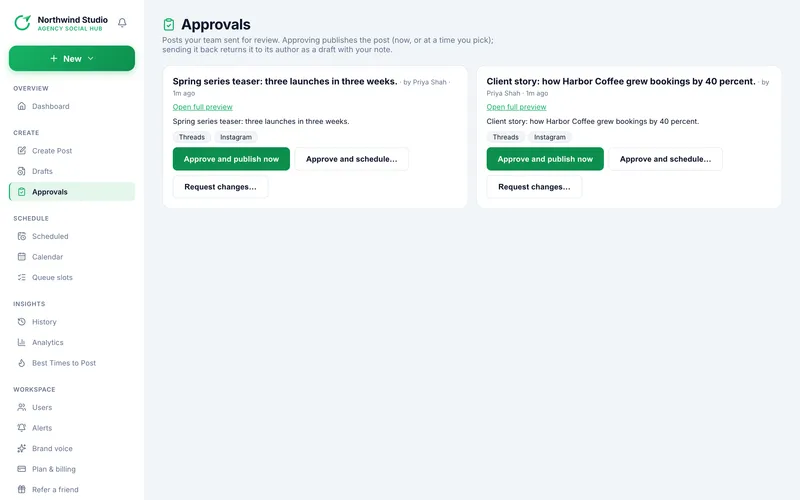
Approvals lists posts waiting for review, oldest first, with the author and how long ago it was sent. Approvers see every post; everyone else sees only the posts they sent. Open full preview opens the post in a new tab.
| Button | What happens |
|---|---|
| Approve and publish now | Publishes to all its platforms immediately. Message: Approved and published. |
| Approve and schedule… | Pick a date and time (2 minutes to 30 days ahead), then Approve and schedule. Message: Approved and scheduled. |
| Request changes… | Type What needs to change? (required, up to 500 characters) and press Send back. The post returns to its author as a draft with your note. |
1. Rules
- You can only approve a post if you may publish to every platform on it: You can't publish to: …, so you can't approve this post. (For example a LinkedIn post needs the LinkedIn publish permission.)
- Approving counts as publishing, so on a free plan it uses one of the week's posts.
- Two people cannot approve the same post: Someone else just reviewed this post.
- A post that is no longer waiting shows This post isn't waiting for review any more.
- The Dashboard shows a link when posts are waiting, and the alerts A post is waiting for approval and A post was approved or sent back with changes tell your team.
Read next
- Send a post for approval How a team member without publish rights submits a post for review, and what happens next.
- Roles and permissions The six roles, the eleven permissions behind them, and the rules that keep access safe.
- Alerts: what they are and what triggers them Get a message in Slack, Teams or your inbox when a post fails, a login ends, a platform hits a limit, and more.
More in Team and approvals
